

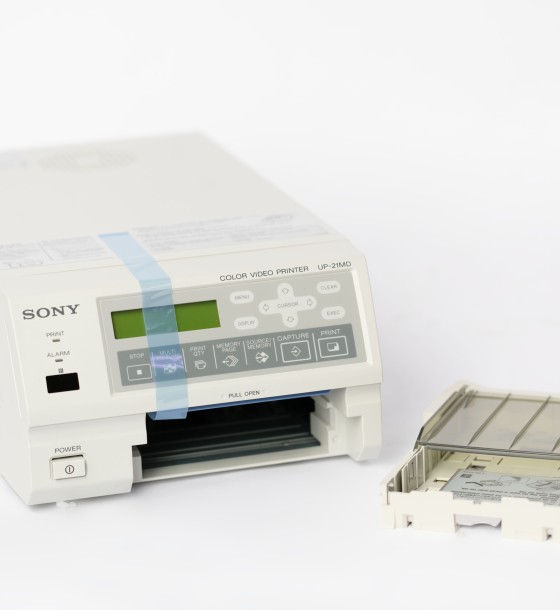
color video printer
15,600.00
Out of Stock
Color Video Printing refers to the process of converting frames or images from a video into printed photos with their natural colors. It’s a great way to preserve special moments or scenes from a video as physical prints. ????️????
Methods for Color Video Printing:
1. Using a Computer and Printer:- Step 1: Select the video with the frames you want to print.
- Step 2: Use video editing software such as:
- VLC Media Player: Allows you to take screenshots from the video.
- Adobe Premiere Pro or Final Cut Pro: Export specific frames from the video in high quality.
- Step 3: Save the frame as an image in JPEG or PNG format.
- Step 4: Print the image using a high-quality color printer.
- Download apps like:
- InShot or Kinemaster: For video editing and extracting frames.
- Frame Grabber (iOS) or Video to Photo (Android): Specifically designed to grab precise frames from videos.
- After extracting the images, you can print them using a home printer or professional printing service.
- For higher-quality prints (such as large photos or display purposes), you can use professional printing services. Simply:
- Extract frames from the video as images.
- Send the images to a nearby print shop or use online printing services.
Tips for High-Quality Color Video Printing:
Best Tools for Extracting Frames from Videos:
- Free Tools:
- VLC Media Player.
- Windows Photos or macOS Preview (to capture video stills).
- Paid Tools:
- Adobe Premiere Pro.
- Final Cut Pro.
Creative Uses for Color Video Printing:
- Turn special video moments into keepsake photos.
- Create unique gifts from favorite video frames.
- Design albums or art frames from cherished memories
Color Video Printing refers to the process of converting frames or images from a video into printed photos with their natural colors. It’s a great way to preserve special moments or scenes from a video as physical prints. ????️????
Methods for Color Video Printing:
1. Using a Computer and Printer:- Step 1: Select the video with the frames you want to print.
- Step 2: Use video editing software such as:
- VLC Media Player: Allows you to take screenshots from the video.
- Adobe Premiere Pro or Final Cut Pro: Export specific frames from the video in high quality.
- Step 3: Save the frame as an image in JPEG or PNG format.
- Step 4: Print the image using a high-quality color printer.
- Download apps like:
- InShot or Kinemaster: For video editing and extracting frames.
- Frame Grabber (iOS) or Video to Photo (Android): Specifically designed to grab precise frames from videos.
- After extracting the images, you can print them using a home printer or professional printing service.
- For higher-quality prints (such as large photos or display purposes), you can use professional printing services. Simply:
- Extract frames from the video as images.
- Send the images to a nearby print shop or use online printing services.
Tips for High-Quality Color Video Printing:
Best Tools for Extracting Frames from Videos:
- Free Tools:
- VLC Media Player.
- Windows Photos or macOS Preview (to capture video stills).
- Paid Tools:
- Adobe Premiere Pro.
- Final Cut Pro.
Creative Uses for Color Video Printing:
- Turn special video moments into keepsake photos.
- Create unique gifts from favorite video frames.
- Design albums or art frames from cherished memories
0 Reviews for color video printer
Related Products


138.00
92.00


126.50


37.30
Customers Also Bought

15.00

184.00
58.50


86.25
